Mapping Modbus Registers from a PLC with Python (Practical Guide)
Learn how to map Modbus registers from an HNC PLC using Python and PyModbus through register scanning and real hardware testing.
Mapping PLCs with Python
This guide is being written and verified through real technical scans performed on HNC HCS series hardware.
For programming these PLCs we will use the HPMaster software. On the development side, we will use Python 3.13 together with the PyModbus 3.X library.
Logic Analysis in HPMaster
Before writing any Python code, it is essential to understand how the variables are declared inside the PLC logic.
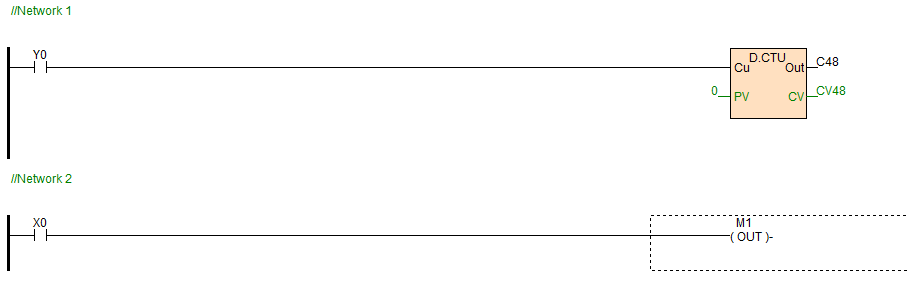
Network Interpretation
Network 1: We observe a serial connection switch and, on the right side, a totalizing counter (CV) with variable C48. This variable is 32 bits wide. It is important to remember that Modbus registers are typically 16 bits, meaning a 32-bit value will occupy two consecutive registers.
Network 2: Here we have another switch and an output coil (Out Coil). When tracking these variables we should expect boolean values:
True / 1 → ON
False / 0 → OFF
Preparation: Monitoring and Forcing Values
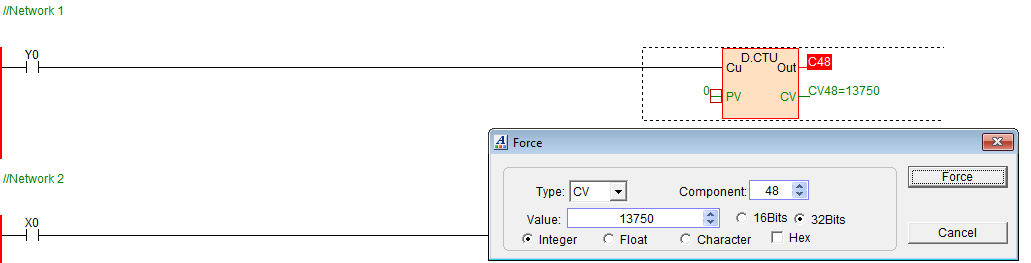
To successfully map the registers, we first monitor the PLC in HPMaster and force known values.
This allows us to confirm that the addresses we read in Python correspond to the variables we expect.

Python Environment Setup
Inside your project folder, create a virtual environment to keep dependencies isolated.
# Create virtual environment
python -m venv .venv

# Activate environment
# Windows
source .venv/Scripts/activate

# Linux / macOS
source .venv/bin/activate

# Install required library
pip install pymodbus
Modbus Register Scanning Script (main.py)
The following script performs a register scan to identify where the values forced in the PLC appear in Modbus memory.
Create a new file called main.py and add the following code:
from pymodbus.client import ModbusTcpClient

# --- GLOBAL CONFIGURATION ---
PLC_IP = '192.168.1.111'
PORT = 502
DEVICE_ID = 1  # Unit ID configured in the PLC

client = ModbusTcpClient(PLC_IP, port=PORT)

def scan_holding_registers(start, end, expected_value, bits32=False):
    """
    Searches for registers matching the value forced in the PLC.
    """
    print(f"\n[SCAN] Searching Holding Registers between {start} and {end}...")

    if bits32:
        count = 2
    else:
        count = 1

    if client.connect():
        for address in range(int(start), int(end) + 1):

            res = client.read_holding_registers(
                address=address,
                count=count,
                device_id=DEVICE_ID
            )

            if not res.isError():

                if bits32:
                    # Some PLCs store the low word first
                    # followed by the high word.
                    # In that case we rebuild the value like this:

                    value_read = (res.registers[1] << 16) | res.registers[0]

                else:
                    value_read = res.registers[0]

                if value_read == int(expected_value):
                    print(f"MATCH FOUND! Address {address}: Value = {value_read}")

                elif value_read != 0:
                    print(f"Data detected at {address}: {value_read}")

        client.close()

    else:
        print("Error: Could not connect to PLC")


def menu():

    print("--- HNC Mapping Tool ---")
    print("1. Scan Holding Registers (V/D)")

    option = input("\nSelect an option: ")

    if option == "1":

        start = input("Start register: ")
        end = input("End register: ")
        expected_value = input("Value forced in the PLC: ")

        scan_holding_registers(start, end, expected_value)


if __name__ == "__main__":
    menu()
Note on 32-bit Registers
Some PLCs store 32-bit variables using two consecutive 16-bit Modbus registers.
Depending on the PLC architecture, the register order may vary:
-
Big Endian
-
Little Endian
In this example, the value is reconstructed using:
(high << 16) | low
Test Architecture
The tests performed in this guide used the following setup:
HNC HCS PLC - Modbus TCP - Local Network - Laptop running Python 3.13 - PyModbus scanning script
Conclusion
Mapping Modbus registers is a fundamental technique when working with industrial PLCs that lack complete documentation.
Using Python and PyModbus, it is possible to automate the register discovery process and integrate PLCs with modern monitoring systems, telemetry platforms, or custom SCADA solutions.
Upcoming Sections
Future updates to this guide will cover more advanced PLC-Python integration topics:
- Automatic Coil scanning
- Reading Input Registers
- Writing Modbus registers using Python
- Strategies for mapping PLCs without documentation
If you work with industrial PLCs and need to integrate them with modern software systems, Python and Modbus provide a powerful way to automate data acquisition and analysis.
This guide will continue expanding with new tools and practical examples of industrial integration.